Наръчник Hama 00050580 Classic 60 Шредер за хартия

Нуждаете се от ръководство за Hama 00050580 Classic 60 Шредер за хартия? По-долу можете да видите и изтеглите PDF ръководството безплатно на български език. В момента този продукт има 2 често задавани въпроси, 0 коментари и има 0 гласа. Ако това не е ръководството, което искате, моля свържете се с нас.

Продуктът ви дефектен ли е и ръководството не предлага решение? Отидете в Repair Café за безплатни ремонтни услуги.

Наръчник

Loading…
3
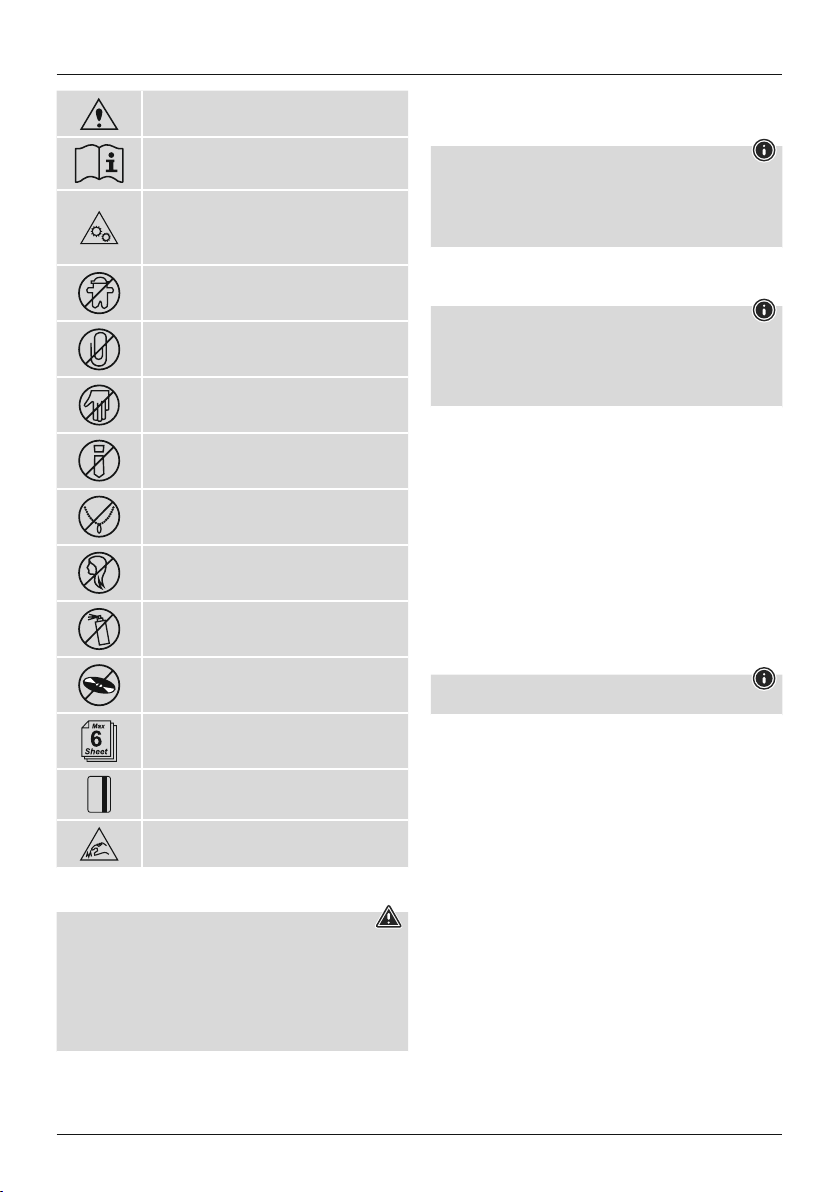
General warning symbol
Beforecommissioning, read the enclosed operating
instructions.
Youmust comply with the safety instructionsatall times.
This device is not intended for use by children.
Avoid touching the intake openingwithhands, clothing
or hair.
Unplug the device if it is not going to be used for a
prolonged period.
Children must be supervised when using the device.
Do not insert paper clips into the intakeshaft.
Do not reach into the intake shaft.
Keep clothing away from the intake shaft.
Keep jewellery,e.g. necklaces, away from the intakeshaft.
Keep hair away from the intake shaft.
Do not use any aerosol products on or near the device.
Do not insert CDs/DVDs into the intakeshaft.
Insert max. 6sheets of paper into the intake shaft atthe same
time (see 7. Technical Data).
Intake shaft for credit cards. Only insert one credit cardata
time into the intake shaft for credit cards.
Sharp edge!
Do not touch!
3. Installation /Setup
Warning
Only operate the product from asocket that has been approved for the device. The
socket must be installed close to the product and must be easily accessible.
Disconnect the product from the power supply using the On/Off switch –ifthis is not
available, unplug the power cordfromthe socket.
If using amulti-socket power strip, make surethat the total power consumption of
allconnected devices does not exceed the socket strip's maximum throughput rating.
If you willnot be using the product for aprolonged period, disconnect it from
mains power.
Position the device head (1) on asuitable waste paper basket. To do this, extend the
extendable arm (2) as far as necessary outofthe device head (1).
Ensurethat the device head (1) is positioned rmly on the waste paper basket and does
not wobble.
Note
Position the waste paper basket with the product on topofitonalevel, horizontal
and suciently stable surface.
Route allcables so thereisnoriskoftripping.
Do not bend or crush the cable.
Protect the connecting cable from hot surfaces and sharp edges.
Connect the mains cable to aproperly installed and easily accessible mains socket.
4. Operation
Note
Be awarethat the thickness of paper increases when it is folded, leading to the
device's maximum page capacity being exceeded.
Always wait until one cutting operationisnished beforestarting the next one.
Do not use the devicecontinuously formorethan 2minutes at atime.
Empty the container regularly in order avoid damaging the device.
4.1 Switching the device on
Move the slider switch (5) to the "on/Auto" position (7).
The device is now ready for use.
4.2 Switching the device off
Move the slider switch (5) to the "Off" position (8).
4.3 Shredding paper
Insert the paper into the centreofthe intake shaft (3). The cutting rollers switch on
automatically.
Let go of the paper.Once the cutting process is complete, the device switches off.
4.4 Shredding plastic cards
Insert the plastic cardinto the centreofthe intake shaft (3). The cutting rollers switch
on automatically.
Let go of the plastic card. Once the cutting process is complete, the device switches
itself off again.
4.5 Forwards /backwards modes
Note
Thesemodes aredesigned to release any blockages of the cutting mechanism.
Move the slider switch (5) to the "Rev" position (9). The rollers on the cutting mechanism
now rotate in the reverse direction.
Move the slider switch (5) alternately to the "Fwd"position (6) and the "Rev" position
(9). Repeat this process around three times.
Then switch the device off-asdescribed in 4.2 Switching the device off -and
disconnect the mains plug.
Remove the blocked cut material carefully from the intake shaft (3).
Reconnect the device -asdescribed in 3. Installation/Setup -tothe power supply.
Изтегли ръководство на български (PDF, 1.25 MB)
(Помислете за околната среда и отпечатайте това ръководство само ако наистина е необходимо)

Loading…

оценка

Кажете ни какво мислите за Hama 00050580 Classic 60 Шредер за хартия, като дадете оценка на продукта. Искате ли да споделите опита си с този продукт или да зададете въпрос? Моля, оставете коментар в долната част на страницата.
Доволни ли сте от Hama 00050580 Classic 60 Шредер за хартия?
да Не
Бъдете първи, оценили този продукт
0 гласове

Присъединете се към разговора за този продукт

Тук можете да споделите какво мислите за Hama 00050580 Classic 60 Шредер за хартия. Ако имате въпрос, първо прочетете внимателно ръководството. Заявката за ръководство може да бъде направена чрез нашата форма за контакт.

Повече за това ръководство

Разбираме, че е хубаво да имате хартиено ръководство за вашия Hama 00050580 Classic 60 Шредер за хартия. Винаги можете да изтеглите ръководството от нашия уебсайт и да го отпечатате сами. Ако искате да имате оригинално ръководство, препоръчваме ви да се свържете с Hama. Може да са в състояние да предоставят оригинално ръководство. Търсите ли ръководството на вашия Hama 00050580 Classic 60 Шредер за хартия на различен език? Изберете предпочитания от вас език на началната ни страница и потърсете номера на модела, за да видите дали го предлагаме.

Спецификации

Марка Hama
Модел 00050580 Classic 60
Категория Шредери за хартия
Тип файл PDF
Размер на файла 1.25 MB

Всички ръководства за Hama Шредери за хартия
Още ръководства на Шредери за хартия

Често задавани въпроси за Hama 00050580 Classic 60 Шредер за хартия

Нашият екип за поддръжка търси полезна информация за продукта и отговори на често задавани въпроси. Ако откриете неточност в нашите често задавани въпроси, моля, уведомете ни, като използвате нашата форма за контакт.

Защо моят шредер за хартия спира след определен период? Проверен

Шредерите за хартия трябва да се охладят след известно време, за да се предотврати прегряване. Времето, през което устройството може да работи, преди да има нужда от охлаждане, варира при различните марки и модели.

Това беше полезно (915) Прочетете още

Колко често трябва да смазвам своя шредер за хартия? Проверен

При случайна употреба е достатъчно да смазвате шредера за хартия веднъж на всеки два месеца. При (много) редовна употреба може да забележите, че машината има затруднения с раздробяването или че хартията лесно засяда. Това са знаци, че машината трябва да се смаже.

Това беше полезно (578) Прочетете още
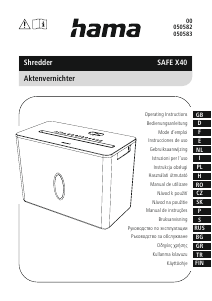
Наръчник Hama 00050580 Classic 60 Шредер за хартия

Свързани продукти

Свързани категории

×
Download