Наръчник Hama 00050580 Classic 60 Шредер за хартия

Нуждаете се от ръководство за Hama 00050580 Classic 60 Шредер за хартия? По-долу можете да видите и изтеглите PDF ръководството безплатно на български език. В момента този продукт има 2 често задавани въпроси, 0 коментари и има 0 гласа. Ако това не е ръководството, което искате, моля свържете се с нас.

Продуктът ви дефектен ли е и ръководството не предлага решение? Отидете в Repair Café за безплатни ремонтни услуги.

Наръчник

Loading…
4
5. Care and maintenance
Danger –risk of death from electric shock
Disconnect the mains plug from the socket beforestarting any cleaning work.
Warning -risk of cutting on the cutting rollers
Do not touch the cutting rollers.
Warning -damage to the device from moisture
Ensure, when cleaning, that no moisturepenetrates the device in order to avoid
irreparable damage to it.
5.1 Emptying the container
Switch the deviceoff -asdescribed in 4.2 Switching the device off -and disconnect
the mains plug.
Lift the device head (1) off the waste paper basket.
Empty the waste paper basket.
Place the device head (1) back on the waste paper basket.
Reconnect the device -asdescribed in 3. Installation/Setup -tothe powersupply.
5.2 Cleaning the device
Switch the device off -asdescribed in 4.2 Switching the device off -and disconnect
the mains plug.
Clean the device with adry cloth. In cases of heavy soiling, the cloth can be dampened
alittle.
Allow the device to dry completelyafterwards.
Reconnect the device -asdescribed in 3. Installation/Setup -tothe power supply.
5.3 Cleaning /oiling the cutting rollers
Note
Oil the cutting rollers after each emptyingofthe waste paper basket in order to
prolong the shredder's service life.
Youcan nd an appropriate selection of cleaning products at https://hama.com.
Switch the device on -asdescribed in 4.1 Switching the device on.
5.3.1 Cleaning with Hama cleaners for shredders (item number: 113820)
Apply the Hama cleaner for shredders (item number: 113820) in several strips onto a
piece of DIN A4-size paper.
Insert the paper into the centreofthe intake shaft (3).
Once the cutting process is complete, the device is ready for operation again.
5.3.2 Cleaning with cleaning paper
Insert the cleaning paper into the centreofthe intake shaft (3). The cutting rollers switch
on automatically.
Once the cutting process is complete, the device is ready for operation again.
6. Troubleshooting
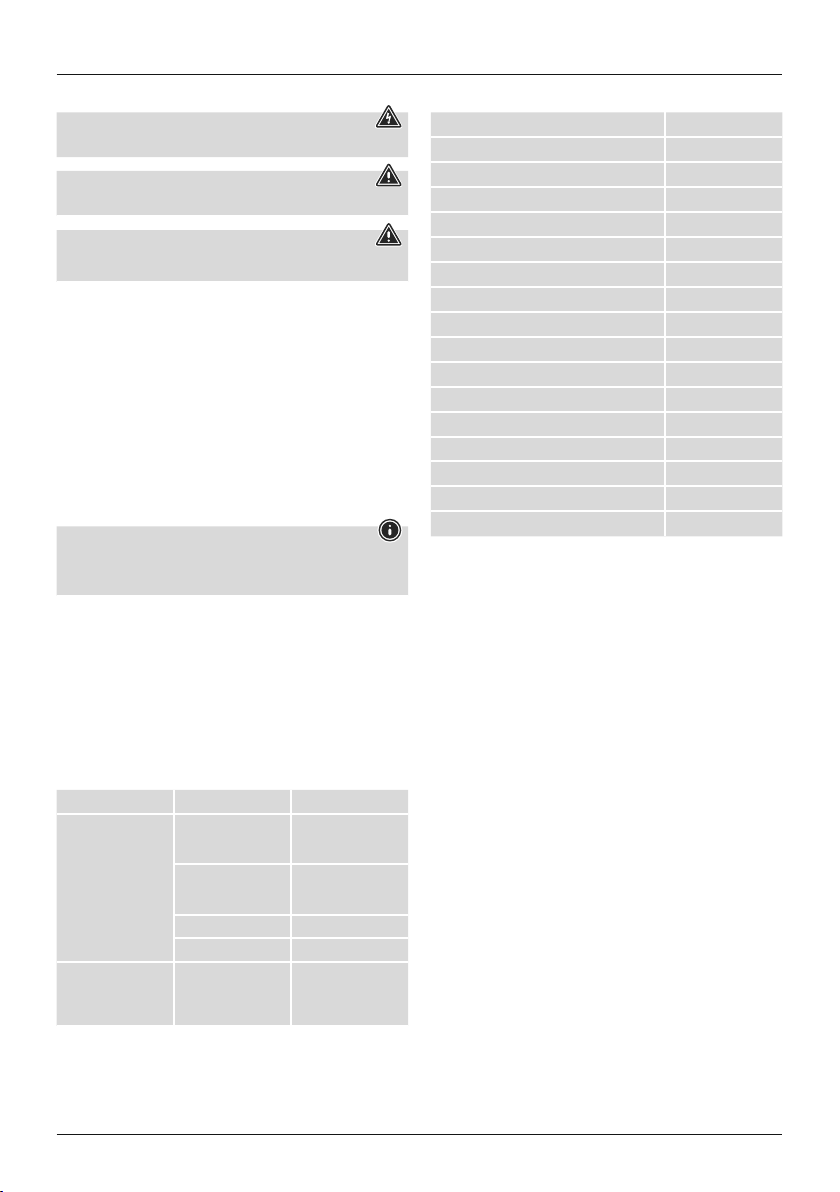
Error Possible cause Remedy
The cutting rollers do not
switch on automatically
when material to be
shredded is inserted.
The slider switch (5) is in
the "Off” position (8).
Move the slider switch
(5) to the "on /Auto"
position (7).
The connecting cable
(10) is not connected
correctly.
Ensurethat the mains
plug is in the mains
socket.
The socket is not live. Check the domestic fuses.
The device is faulty.Notify Customer Services.
The device switches itself
off after aprolonged
period of use and cannot
be switched back on.
The device has become
too hot.
Switch the device off and
allow it to cool down for
at least 30 minutes.
7. Technicaldata
Input voltage 220-240 V~
Mains Frequency 50 Hz
Max. Power consumption180 W
Dimensions (W xHxD)30.0 x12.0 x7.0 cm
Weight (net) 1219 g
Weight (gross) 1372 g
Noise level when idling 74 dB
Max. cutting performance -paper (70 gsm) 6sheets (DIN A4 paper)*
Max. cutting performance -paper (80 gsm) 6sheets (DIN A4 paper)*
Max. cutting performance -plastic cards 1
Max. cutting speed 3.8 m/minute
Max. feed width for paper /plastic cards 220 mm
Cutting size for paper /plastic cards 6mm
Max. constant operationtime 2minutes
Nominal rest period Min. 30 minutes
Protection class (as per DIN 66399) 1
Safety levels (as per DIN 66399) P-2, T-2, E-2
*Thicker paper,moistureorany voltage other than that permitted may reduce the
performance.
8. Warranty disclaimer
Allofthe technical information, data and instructions regarding operation contained in
these operating instructions was up to date at the time of printing and is provided based
on previous experience and to the best of ourknowledge.
Hama GmbH &CoKGassumes no liability and provides no warranty for damage resulting
from improper installation/mounting, improper use of the product or from failuretoobserve
the operating instructions and/orsafety notes.
Изтегли ръководство на български (PDF, 1.25 MB)
(Помислете за околната среда и отпечатайте това ръководство само ако наистина е необходимо)

Loading…

оценка

Кажете ни какво мислите за Hama 00050580 Classic 60 Шредер за хартия, като дадете оценка на продукта. Искате ли да споделите опита си с този продукт или да зададете въпрос? Моля, оставете коментар в долната част на страницата.
Доволни ли сте от Hama 00050580 Classic 60 Шредер за хартия?
да Не
Бъдете първи, оценили този продукт
0 гласове

Присъединете се към разговора за този продукт

Тук можете да споделите какво мислите за Hama 00050580 Classic 60 Шредер за хартия. Ако имате въпрос, първо прочетете внимателно ръководството. Заявката за ръководство може да бъде направена чрез нашата форма за контакт.

Повече за това ръководство

Разбираме, че е хубаво да имате хартиено ръководство за вашия Hama 00050580 Classic 60 Шредер за хартия. Винаги можете да изтеглите ръководството от нашия уебсайт и да го отпечатате сами. Ако искате да имате оригинално ръководство, препоръчваме ви да се свържете с Hama. Може да са в състояние да предоставят оригинално ръководство. Търсите ли ръководството на вашия Hama 00050580 Classic 60 Шредер за хартия на различен език? Изберете предпочитания от вас език на началната ни страница и потърсете номера на модела, за да видите дали го предлагаме.

Спецификации

Марка Hama
Модел 00050580 Classic 60
Категория Шредери за хартия
Тип файл PDF
Размер на файла 1.25 MB

Всички ръководства за Hama Шредери за хартия
Още ръководства на Шредери за хартия

Често задавани въпроси за Hama 00050580 Classic 60 Шредер за хартия

Нашият екип за поддръжка търси полезна информация за продукта и отговори на често задавани въпроси. Ако откриете неточност в нашите често задавани въпроси, моля, уведомете ни, като използвате нашата форма за контакт.

Защо моят шредер за хартия спира след определен период? Проверен

Шредерите за хартия трябва да се охладят след известно време, за да се предотврати прегряване. Времето, през което устройството може да работи, преди да има нужда от охлаждане, варира при различните марки и модели.

Това беше полезно (915) Прочетете още

Колко често трябва да смазвам своя шредер за хартия? Проверен

При случайна употреба е достатъчно да смазвате шредера за хартия веднъж на всеки два месеца. При (много) редовна употреба може да забележите, че машината има затруднения с раздробяването или че хартията лесно засяда. Това са знаци, че машината трябва да се смаже.

Това беше полезно (578) Прочетете още
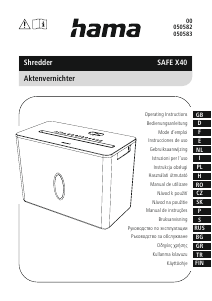
Наръчник Hama 00050580 Classic 60 Шредер за хартия

Свързани продукти

Свързани категории

×
Download