Наръчник Thomson ROC1128PAN Дистанционно управление

Нуждаете се от ръководство за Thomson ROC1128PAN Дистанционно управление? По-долу можете да видите и изтеглите PDF ръководството безплатно на български език. В момента този продукт има 6 често задавани въпроси, 0 коментари и има 5 гласове със среден рейтинг на продукта 20/100. Ако това не е ръководството, което искате, моля свържете се с нас.

Продуктът ви дефектен ли е и ръководството не предлага решение? Отидете в Repair Café за безплатни ремонтни услуги.

Наръчник

Loading…
23
GB
GB
AAA
  
  
Thank you for your decision for aThomson product.
Take your time and read the following instructions
and information completely. Please keep these
instructions in asafe place for future reference.
This remote control can by default control 90%
models of PANASONIC brand, there´s no need to
set it up. lf the remote doesn‘t work, please choose
one of the setup methods described in chapter 5.
 
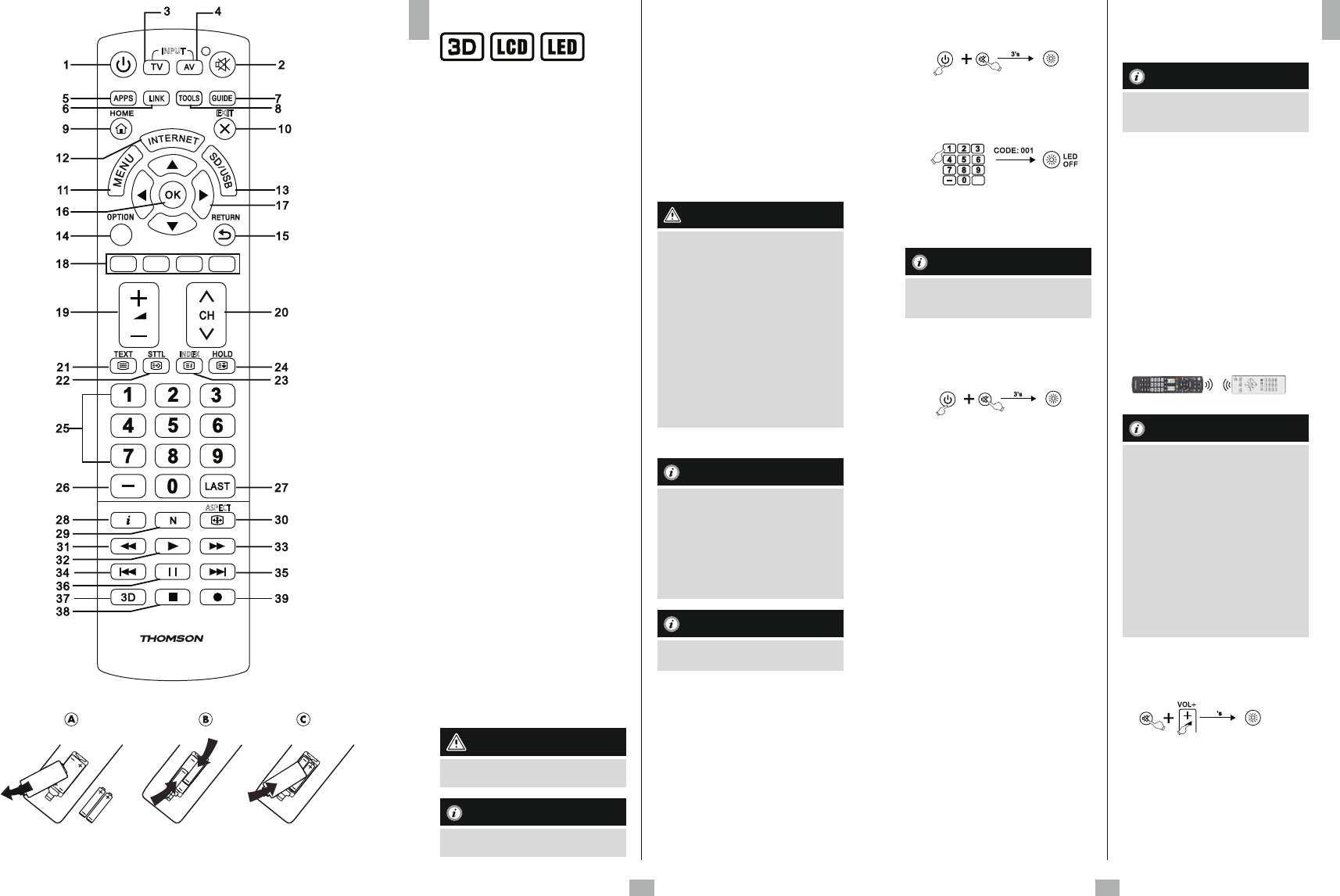
1. Power TV ON/OFF
2. Turn your TV sound ON/OFF
3. TV Mode
4. AV Mode
5. APPS
6. LINK
7. Show the Electronic Program Guide
(if supported by the TV)
8. Tools menu
9. HOME
10. Exit Menu
11. Menu
12. Internet
13. SD/USB Mode
14. Option and Tools
15. Back key
16. Enter
17. Use when watching TV to see what´s on
other channels or to highlight/select On-
Screen options
18. Use to select avariety of on screen options
19. Volume +/-
20. Program +/-
21. Teletext ON/OFF
22. Teletext Subtitle
23. Teletext Info
24. Teletext Hold
25.
Numeric keys 0–9toenter channel numbers
26.
Access to 2- or 3-digit channel numbers
27. Previous Channel
28. Info
29. Normal
30. PictureSize
31. Goes backward(DVD, BlueRay ... )
32. Play adisc (DVD, BlueRay ... )
33. Fast Forward(DVD, BlueRay ...)
34. Player Preview (DVD, BlueRay ...)
35. Player Next (DVD, BlueRay ...)
36. Suspends play and stops on an image
(DVD, BlueRay…)
37. 3D Mode ON/OFF
38. Stop the disc (DVD, BlueRay ... )
39. Record
      


This symbol is used to indicate safety instructions or
to draw your attention to specic hazards and risks.

This symbol is used to indicate additional
information or important notes.
  
•Replacement Remote Control
•2xAAA Batteries
•This operating instructions incl. Code List
  
•Donot use the Universal Remote Control in
moist or wet environments and avoid spray-
water contact.
•Donot expose the Universal Remote Control
to heat sources or direct sunlight.
•Donot drop the Universal Remote Control.
•Never open the Universal Remote Control. It
contains no user-serviceable parts.
•Aswith allelectrical devices, keep the
Universal Remote Control away from
children.

•When inserting batteries, note the
correct polarity (+ and -markings) and
insert the batteries accordingly.Failureto
do so could result in the batteries leaking
or exploding.
•Donot short-circuit batteries.
•Donot charge batteries.
•Donot throw batteries in are.
•Keep batteries out of the reach of
children.
•Donot allow children to change batteries
without supervision.
•Remove the batteries from products
that arenot being used for an extended
period.
     

•Use 2AAA batteries
•Remove the battery cover from bottom
of remote.
•Check the +/- polarity on the batteries
and inside the compartment.
•Insert the batteries.
•Slide the battery holder back into the
remote until the clips locate.
  
This remote control saves the settings during
battery change.
 
This remote control can by default control 90%
models of PANASONIC brand, there´s no need
to set it up. lf it doesn‘t work, please choose
one of the following setup methods 5.1 or 5.2.

 
 
       
       
       
       
       
       
1. Press and hold the key [MUTE] and
[POWER] until the LED will be lit,
then release keys.
2. Enter the three codes from code Iist.
When the code input is nished, the
LED will turn off.
LAST
3. Please try to use the remote control.
lf it doesn‘t work well, please try other
codes: [002], [003], [004] ...

lf the code is invalid, the LED ashes twice
and then lights up permanently.Toexit the
setup, please press [MUTE].
  
1. Press and hold the key [MUTE] and
[POWER] until the LED will be lit, then
release keys.
2. Press the key [CH+]. Each time you
press, the remote will search once.
When the code changes, you can test
if [POWER], [VOL+],[MENU],[0-9] keys
work well. If ok ,please press [MUTE] to
save the code and exit.
3. lf it doesn‘t work well, repeat the fast
search by pressing [CH+].
  
Use the following method to nd out which
code is currently set:
1. Press and hold [MUTE], then press
[POWER] until the LED will be lit, then
release keys.
2. Input [9].[9].[0] with number keys. The
LED will ash twice and goes off.
3. Press the number key 1for the 1st digit
of the code. The LED will start to ash.
Count the LED ashes. The number of
ashes resemble the code‘s rst digit.
Repeat this procedurefor the 2nd and
3rddigit of the code:
2nd digit -> enter 2->count LED
ashes
3rddigit -> enter 3->count LED ashes
lf code number is [0] the LED will not
ash.

   
Due to too many Remote Control models, we
only Iist some of them below. lf your remote
control is similar to the drawing, the replacement
remote can control your TV (Page 74).
.
    
Press and hold the [RETURN] and [0] buttons for
about 5seconds until the status LED flashes three
times and then goes out. The remote control is
now successfully reset to the factory settings.

All keys with learnt codes or all copied keys,
as well as all remote control settings will
be deleted.
  
This remote control is equipped with alearning
function. Thus, you could learn functions of
your original remote to this remote control.
    
•The batteries in the two remote controls
have to be in good condition. Replace them
if necessary.
•Place the remote controls with the infrared
diodes so that they point towards each
other.
•Wherenecessary adjust the height of both
remotes so that infrared diodes areproperly
aligned.
•The distance between the remote controls
should be about 3cm.

•Donot move the remote controls during
the learning procedure.
•E
nsur
et
hat
the
ro
om
is
not
lit
by
uor
escents
tubes
or
low
ener
gy
consumption lamps since such light
sources could interferewith the copying.
•The 2remotecontrols must be at least
1meter away from any light source.
•During learning mode, if no key is
selected for morethan 15 seconds, the
learning mode will exit automatically or
if no other remote signal is received.
•Each function key will hold only one
command. Anew command to be learned
will automatically replace the previous one.
   
1. Press and hold the [MUTE] and [VOL+]
keys for approx. 5seconds until the LED
will be lit.
5
2. Enter the code [9] [8] [0], the LED will ash
2times and then remain on.
3. The remote control is now ready to learn
new commands.
   
1. Press and release the desired key on the
original remote control which you want the
command to be learned. The LED at your
replacement remote will ash to conrm
that the information has been received.
INDEX
ASPECT
INPUT
LINK
EXIT
ca. 3cm
ORIGINAL
ROC1128PAN
Изтегли ръководство на български (PDF, 2.4 MB)
(Помислете за околната среда и отпечатайте това ръководство само ако наистина е необходимо)

Loading…

оценка

Кажете ни какво мислите за Thomson ROC1128PAN Дистанционно управление, като дадете оценка на продукта. Искате ли да споделите опита си с този продукт или да зададете въпрос? Моля, оставете коментар в долната част на страницата.
Доволни ли сте от Thomson ROC1128PAN Дистанционно управление?
да Не
20%
80%
5 гласове

Присъединете се към разговора за този продукт

Тук можете да споделите какво мислите за Thomson ROC1128PAN Дистанционно управление. Ако имате въпрос, първо прочетете внимателно ръководството. Заявката за ръководство може да бъде направена чрез нашата форма за контакт.

Повече за това ръководство

Разбираме, че е хубаво да имате хартиено ръководство за вашия Thomson ROC1128PAN Дистанционно управление. Винаги можете да изтеглите ръководството от нашия уебсайт и да го отпечатате сами. Ако искате да имате оригинално ръководство, препоръчваме ви да се свържете с Thomson. Може да са в състояние да предоставят оригинално ръководство. Търсите ли ръководството на вашия Thomson ROC1128PAN Дистанционно управление на различен език? Изберете предпочитания от вас език на началната ни страница и потърсете номера на модела, за да видите дали го предлагаме.

Спецификации

Марка Thomson
Модел ROC1128PAN
Категория Дистанционни
Тип файл PDF
Размер на файла 2.4 MB

Всички ръководства за Thomson Дистанционни
Още ръководства на Дистанционни

Често задавани въпроси за Thomson ROC1128PAN Дистанционно управление

Нашият екип за поддръжка търси полезна информация за продукта и отговори на често задавани въпроси. Ако откриете неточност в нашите често задавани въпроси, моля, уведомете ни, като използвате нашата форма за контакт.

Как да свържа универсално дистанционно управление към моя телевизор? Проверен

За да свържете вашето универсално дистанционно управление, имате нужда от номера на модела и името на марката както на дистанционното управление, така и на телевизора. Има списък с кодове за марки и номера на модели в ръководството на дистанционното управление.

Това беше полезно (7983) Прочетете още

Защо има букви до цифрите на дистанционното управление? Проверен

Някои настройки на телевизора може да изискват въвеждане на букви. Обикновено върху един бутон има три букви или други знаци. Когато се изисква въвеждане на буква, можете да натиснете този бутон веднъж за първата буква, да натиснете два пъти за втората буква и да натиснете 3 пъти за третата буква. По този начин текстът може да бъде написан с минимален брой бутони.

Това беше полезно (682) Прочетете още

Дистанционното ми управление ще работи ли и на други модели телевизори от същата марка? Проверен

Често дистанционното управление на телевизор ще работи и на подобни модели от същата марка. Въпреки това е необичайно, че ще работи на всички модели на тази марка. Универсалните дистанционни управления са по-подходящи за това.

Това беше полезно (524) Прочетете още

Какъв е средният обхват на инфрачервеното дистанционно управление? Проверен

Средното инфрачервено дистанционно управление има обхват от около 3 до 6 метра. Освен това, колкото по-далеч е устройството, толкова по-трудно ще бъде да се прицелите.

Това беше полезно (412) Прочетете още

Батерията в моето устройство е окислена, мога ли да я използвам безопасно? Проверен

Да, устройството все още може да се използва безопасно. Първо извадете оксидираната батерия. Никога не използвайте голи ръце, за да направите това. След това почистете отделението за батерията с памучен тампон, потопен в оцет или лимонов сок. Оставете да изсъхне и поставете нови батерии.

Това беше полезно (371) Прочетете още

Мога ли да оставя сменяема батерия в устройство за дълго време? Проверен

Сменяемите батерии могат да останат в устройството за дълго време, ако устройството се използва. Когато устройството се съхранява дълго време, препоръчително е да извадите батериите, за да предотвратите окисляване.

Това беше полезно (271) Прочетете още
Наръчник Thomson ROC1128PAN Дистанционно управление

Свързани продукти

Свързани категории

×
Download